Giswater QWC2 Documentation Logo
master
Index

FOR USERS

  • User Documentation
    • QWC2 Features
      • Login
      • Measurement
      • Boundary Line
      • Themes Selector
      • Layers and Legend
      • Tools Menu
        • Description
        • How to use
      • Share Link
      • Export Map
      • Routing
      • Print
      • Options
      • Right Lateral Panel
      • Street View
    • Giswater Features

FOR ADMINISTRATORS

  • Administrator Documentation
Giswater QWC2 Documentation
  • Guide for Giswater QWC2 Users
  • QWC2 Features
  • Tools Menu
  • Edit on GitHub
Previous Next

Tools Menu icon

Description

The Tools Menu button, located in the top-right corner of the viewer, opens a side menu that groups various system functions. In this menu, tools may appear that are also available in the top bar, such as Theme or Layers, along with other additional options depending on the project’s configuration.

How to use

When you select the Tools Menu button, a vertical panel opens showing the complete list of available functions. From this panel, you can directly run tools such as Bookmarks, Printing, Help or other specific utilities that have been enabled. The composition of this menu is fully configurable: items can be added or removed depending on the active theme. To close the menu, just press the same button again.
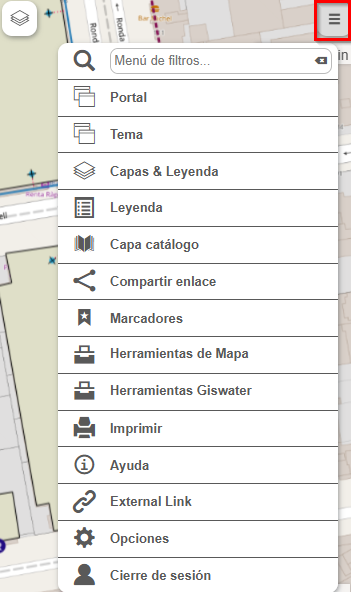
../../../../_images/mapa_herramientas.png

Fig. 9 Available tools menu.

Previous Next

© Copyright 2025, Giswater QWC2. Last updated on 2026 Apr 02, 10:22 +0000.

Built with Sphinx using a theme provided by Read the Docs.
Giswater QWC2 Documentation v: master
Languages
es_CR
en
Versions
latest
master