Tiled Themes
Description
For Giswater projects whose extent is so large that it is not possible to guarantee adequate performance using QGIS Server’s ‘hot rendering’, there is the option to publish the projects using the tiled map approach.
The architecture we use for tiled Giswater projects in QWC2 consists of:
PostgreSQL: Giswater database. Uses materialized views to improve performance.
MapProxy: Proxy responsible for caching and serving the tiles.
QWC2: Web viewer that consumes tiles from MapProxy externally (it does not use QGIS Server to improve performance).
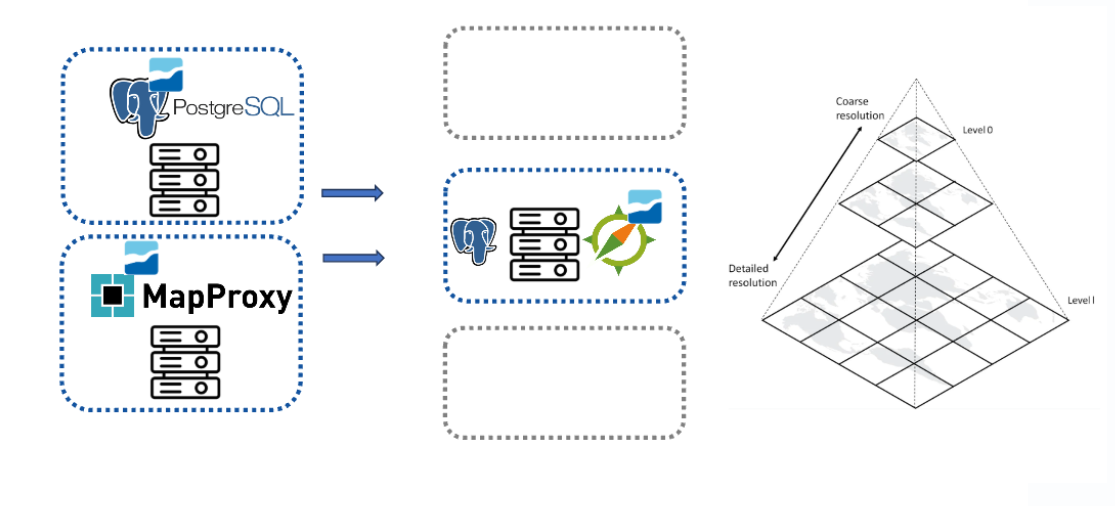
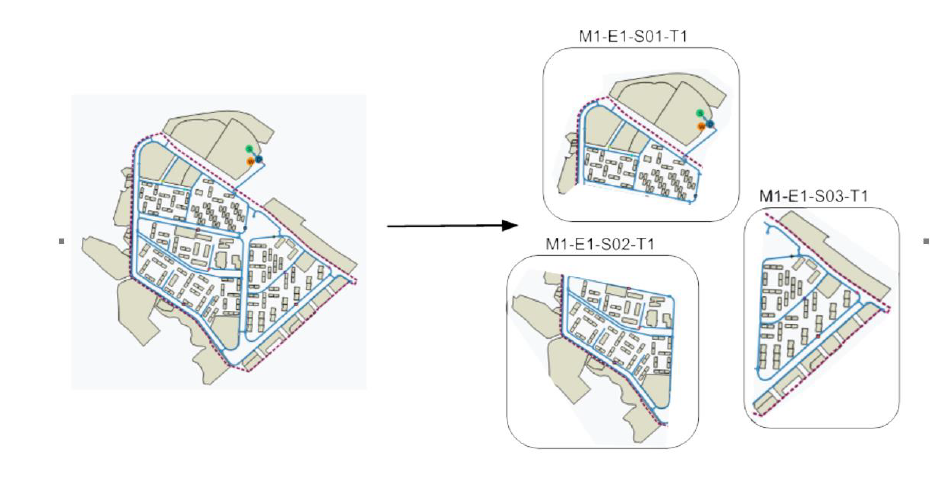
MapProxy caches the network so that for each selected zoom level, a matrix of images (tiles) is generated and stored on the server, so they can be served quickly afterwards. To not lose Giswater functionality, the tileclusters approach is used, which allows splitting the network into Giswater-specific map areas (Municipality, Operation, Sector, State, etc.). This also lets you use the Selector in the same way, since we can control which parts of the network are shown at each moment according to the Selector.
Along with this, a replicated database architecture is also implemented, so that web viewer read requests are performed against the replica database, while write requests are performed against the primary database, relieving load from the primary database.
Advantages
Higher performance in displaying the network when using tiles instead of hot rendering.
Read requests are made to the replica database, reducing load on the primary database.
Requests are made directly to MapProxy: we do not go through QGIS Server.
Disadvantages
Changes to the network are not reflected immediately in the viewer, because the new tiles must be generated.
The first tiling of a project can be slow, although subsequent updates are much faster.
More complex setup and publishing.
Warning
Documentation on how to publish a QGIS project in QWC2 can be found in Publish QGIS Project, and is only relevant for non-tiled themes.